
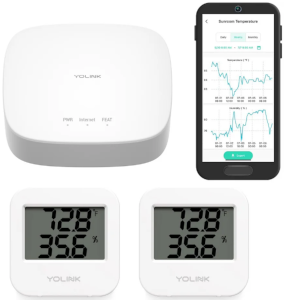
If you manage or live in a commercial building, apartment, or rental property, you know how tricky it can be to prove when a room is too cold in the winter or too hot in the summer. Maybe you’ve tried to tell your landlord about temperature issues, only to be met with a shrug. That’s where YoLink temperature sensors come in, a low-cost, powerful way to collect and document the actual temperature and humidity in any room, at any time.
Why Monitor Temperature and Humidity?
Having hard data changes the game. With YoLink sensors, you can:
- Show your landlord documented temperature trends over time
- Prove that heating or cooling systems are failing to maintain comfortable or legal indoor temperatures
- Catch HVAC issues early, before they lead to tenant complaints or property damage
- Keep tenants comfortable and safe
For renters, it's an easy way to back up your maintenance requests with clear evidence.
Low-Cost Setup: What You Need
You only need two things to get started:
- A YoLink Hub (about $25–$30)
- A Temperature & Humidity Sensor (about $20–$25 per room)
No monthly fees. No expensive wiring. Just plug in the hub, place the sensors, and you’re good to go.
Add as many sensors as you want, one for each room you want to monitor. You’ll see live readings in the YoLink app and get alerts sent straight to your phone.
Set Alerts to Stay Ahead
What if a room drops below 60°F? Or gets too humid? Or spikes to 85°F during the weekend when no one’s around?
With YoLink, you can set custom alerts so you’ll know immediately when something’s off. Whether you're managing a building remotely or just looking out for your own comfort, these real-time notifications help you take action before small problems become big ones.
LoRa: Built for Commercial Spaces
One of YoLink’s biggest advantages is its LoRa (Long Range) wireless network. Unlike Wi-Fi or Bluetooth, LoRa can travel through walls, floors, and even concrete, making it perfect for office buildings, basements, and older apartment complexes.
That means:
- No repeaters needed
- No reliance on your building’s Wi-Fi
- Better signal reliability in tough environments
You can place sensors anywhere, even in far-off utility rooms, and still get reliable updates.
Expand Your Smart Monitoring System
Temperature sensors are just the beginning. Once you’ve installed the YoLink Hub, you can add a wide variety of other smart sensors for peace of mind:
- Water Leak Detectors – prevent major damage from hidden leaks
- Motion Sensors & Door Sensors – keep an eye on vacant units or storage rooms
- Smart Plugs & Energy Meters – monitor and control power use
- Smoke & CO Sensors – add another layer of safety
- Smart Relays & Thermostats – automate building systems
All managed in one app: simple, affordable, and powerful.
Ready to start monitoring your building the smart way? BitFog can help you get up and running with a complete YoLink setup tailored to your building’s needs. Let’s make your building smarter, safer, and more efficient, without breaking the bank.
 When bats returned to the attic after a professional exclusion, I built a custom detection system using a USB ultrasonic microphone, night vision RTSP cameras, a Raspberry Pi 5, and a bit of Python. The setup automatically captured echolocation calls and matched them with video, helping pinpoint the exact entry point, no attic trips required. Lewis Pest Control honored their guarantee and sealed the spot for free.
 Think AI is too complex or expensive for your business? Think again. This post breaks down three simple, practical ways local companies are using AI right now, like answering phones, managing email, and scheduling appointments. If you’re curious but cautious, this is a great place to start.